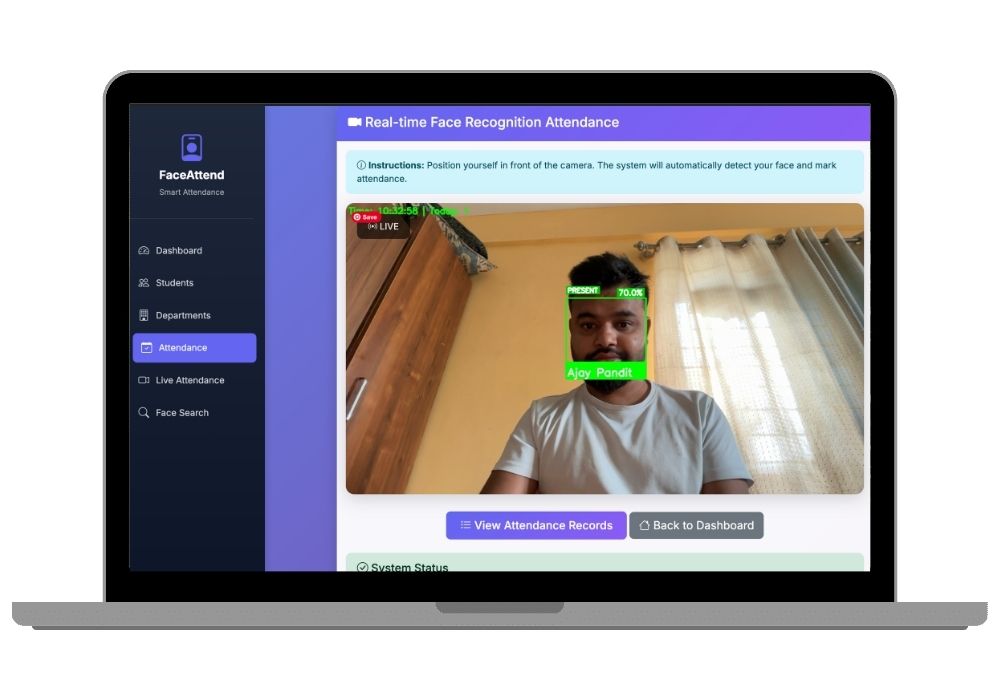
Face Recognition Attendance System with Django & OpenCV - AI-Powered Final Year Project with Source Code
Real-time face recognition attendance system using Django and OpenCV — auto-marks student check-in/check-out via webcam with 128-dimensional face encoding matching, department-wise reporting, and 99%+ accuracy on standard benchmarks.
Technology Used
Django 4.2.7 | Python 3.8+ | OpenCV 4.8.1 | face-recognition 1.3.0 | NumPy 1.24.3 | SQLite | Bootstrap 5 | Bootstrap Icons | Django Crispy Forms | Pillow 10.1.0 | pytz


Project Files
Face Recognition Attendance System - Final Year Project (Django + OpenCV)
Manual attendance registers are slow and easy to fake. This final year project replaces that with a Django and OpenCV based system that recognizes a student's face through a webcam and logs attendance on its own, no roll call needed.
What This Project Actually Does
The system runs on Django with OpenCV handling the computer vision side of things. A student's face gets registered once through the webcam, the system generates a face encoding for it, and from then on, that student can just look at the camera to get marked present. Everything - the check-in time, the department, the class - gets logged automatically in the database. It comes with full source code, a working demo, documentation, and everything you'd need to explain it in a viva.
Features
- Live face recognition: Points the webcam at a student, matches them against the database in real time, and shows a confirmation on screen the moment it recognizes them
- Attendance logging: Records check-in and check-out with exact timestamps - no manual entry involved
- Student dashboard: Add, edit, or remove student records, sort them by department and class
- Face registration: A simple capture screen that stores each student's face as a 128-point encoding rather than a raw photo
- Photo search: Upload any picture and the system will tell you which student it matches, along with a confidence score
- Reports: Attendance history and statistics you can pull up for any student or class
- Department structure: Students are organized by department, class, and academic year so the data stays manageable
- UI: Built on Bootstrap 5, works fine on phones too
- Basic security: CSRF protection, validated file uploads, and standard SQL injection safeguards
- Kept it fast: Face detection runs on a downscaled frame so it doesn't lag even on an average laptop
Where You Could Actually Use This
- Colleges and schools for lecture, lab, or exam hall attendance
- Training centers running certification courses
- Coaching institutes that want to track regularity without a register
- Seminars or conferences where you need a quick check-in log
- Libraries, for tracking who's entering and leaving
- Hostels, for check-in/check-out monitoring
Why It's a Solid Pick for Your Final Year
You'll actually work with the Django framework properly - models, views, templates, the works - alongside real face detection and encoding logic instead of a toy dataset. It's the kind of project that holds up under panel questions because there's real computer vision happening, not just a UI wrapped around a tutorial.
You get the full project report, system design diagrams, UML diagrams, and presentation slides included, so you're not stitching documentation together the night before submission. If you're aiming for a research paper on biometric attendance or AI applications in education, this project gives you a working base to write around. It's also something you can point to in interviews - a deployable AI/ML project, not just a college assignment. The code is commented well enough that you can modify it for your specific institution's requirements without much trouble.
Tech Stack
Django on the backend, OpenCV for image processing, and face recognition handled through the face_recognition library, which is built on dlib and reports around 99.38% accuracy on standard benchmarks. Runs on SQLite out of the box for development, and switching to PostgreSQL or MySQL for a production setup is straightforward. Face encodings are stored as binary data rather than images, which keeps the database lean.
What's Included
- Full Django source code with dependencies listed
- Pre-loaded sample data so you can demo it immediately
- Setup documentation with screenshots
- Project report - abstract, literature review, system design, implementation, testing, conclusion
- PPT for your project defense
- A research paper draft you can adapt for IEEE or journal submission
- UML diagrams - use case, class, sequence, activity
- Deployment notes for hosting it on a cloud platform
- A video walkthrough of the features
- Setup and customization support after purchase
What You'll Learn Building/Studying This
Django's MVT architecture, REST APIs, database design, face detection and encoding, handling live video streams, Bootstrap frontend work, secure file handling, and how to actually deploy a Django project - not just run it locally. These are things that come up in real interviews, not just academic checklists.
Where You Could Take It Further
If you want to extend it beyond the base project: a Flutter or React Native app for mobile attendance, REST APIs for integrating with other campus systems, support for multiple campuses under one database, SMS or email alerts for absentees, Redis caching if you're scaling it up, Docker for easier deployment, or moving file storage to AWS S3 or Google Cloud.
Frequently Asked Questions
Extra Add-Ons Available – Elevate Your Project
Add any of these professional upgrades to save time and impress your evaluators.
Project Setup
We'll install and configure the project on your PC via remote session (Google Meet, Zoom, or AnyDesk).
Source Code Explanation
1-hour live session to explain logic, flow, database design, and key features.
Want to know exactly how the setup works? Review our detailed step-by-step process before scheduling your session.
₹1999
Custom Documents (College-Tailored)
- Custom Project Report: ₹1,500
- Custom Research Paper: ₹1,000
- Custom PPT: ₹800
Fully customized to match your college format, guidelines, and submission standards.
Project Modification
Need feature changes, UI updates, or new features added?
Charges vary based on complexity.
We'll review your request and provide a clear quote before starting work.