AI Traffic Signal Optimizer Using YOLOv8 – Django Final Year Project
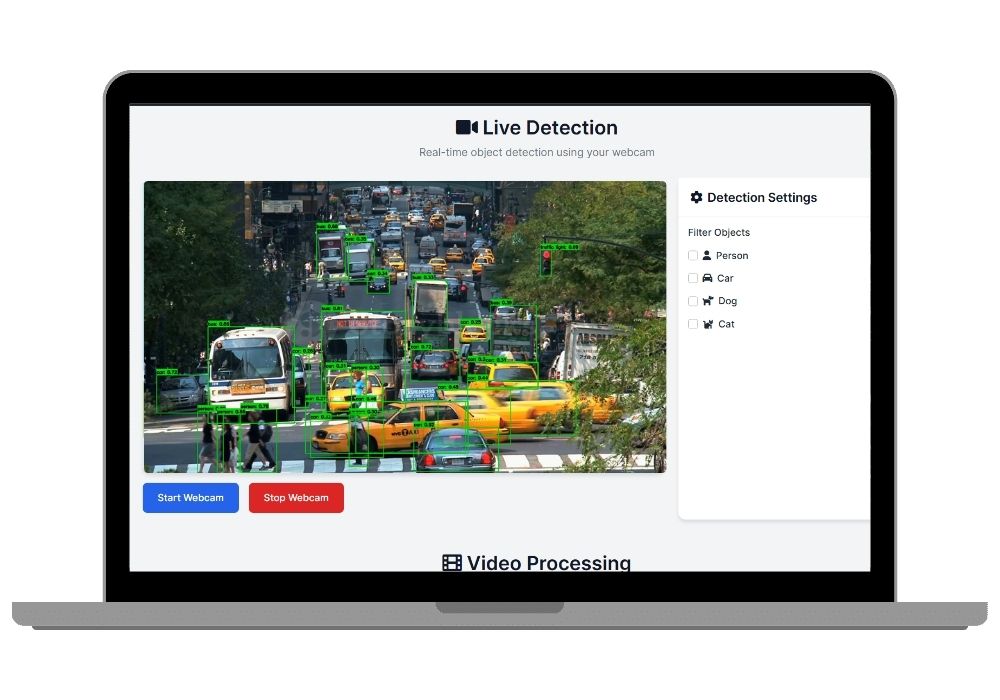
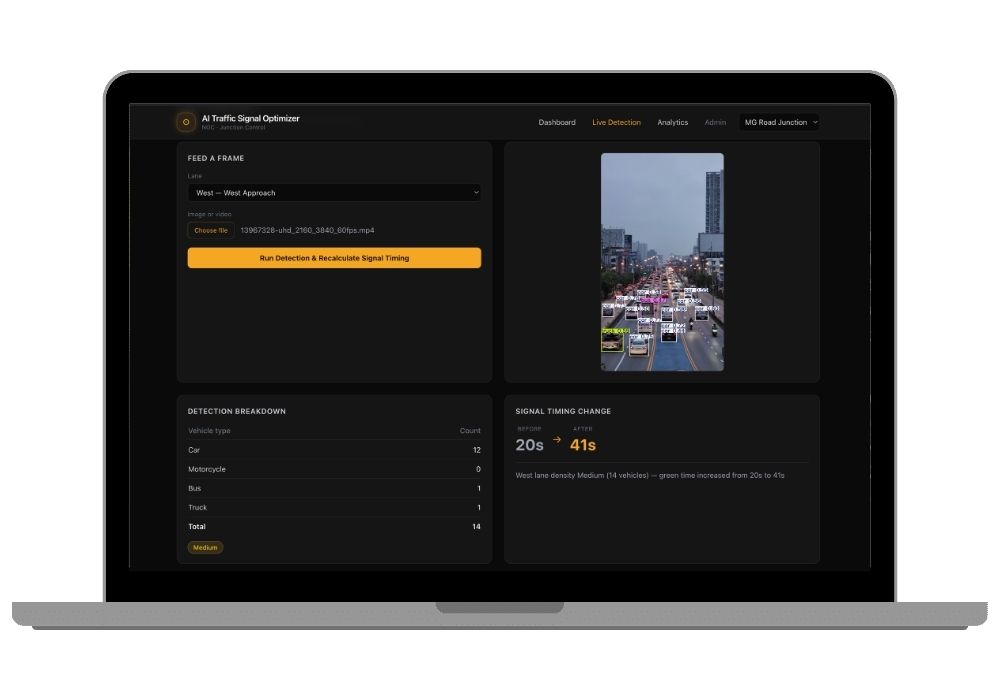
A Django-based smart traffic system that uses YOLOv8 vehicle detection to read live lane density and auto-adjust signal timings, with a real-time Obsidian Gold NOC-style dashboard.
Technology Used
Django 5.2 | Django REST Framework | YOLOv8 (Ultralytics) | OpenCV | SQLite | Tailwind CSS | Chart.js | JavaScript


Project Files
About the Project
The AI Traffic Signal Optimizer is a full-stack Django final year project that brings real computer vision into everyday traffic management. Instead of fixed-timer signals, this system watches each lane at a junction through YOLOv8 object detection, works out how congested every direction actually is, and recalculates green-light durations on the fly. It is built for students who want a project that goes beyond a basic CRUD app and shows genuine applied AI skills to evaluators and interview panels alike.
Project Features
- Real-time vehicle detection and counting per lane using YOLOv8 and OpenCV
- Adaptive signal timing algorithm that scales green time with traffic density, bounded by configurable min/max limits
- Live NOC-style dashboard built with Tailwind CSS and Chart.js, auto-refreshing through JS polling
- Dedicated live detection view for uploading footage or images per lane
- Analytics dashboard tracking historical signal logs and density trends
- REST API layer built on Django REST Framework for all detection and signal data
- Management commands to seed demo junctions and simulate traffic cycles without needing camera footage
- Configurable density thresholds and timing rules in a single settings file
Applications
This concept applies directly to smart city traffic control, campus and township junction management, toll plaza queue balancing, and any research or prototype work around adaptive infrastructure. It is also a strong base for extending into multi-junction coordination or emergency-vehicle priority systems.
Who It's For
BTech CSE, BCA, MCA, and BSc IT students looking for a final year or major project in AI, computer vision, or Django, especially those who want a demo-able system with a working detection pipeline rather than a static report-only submission. It also suits students preparing for placement interviews who want to speak confidently about a real YOLOv8 integration.
Why Choose This Project
Unlike many pre-built Django final year projects that only demonstrate database operations, this one runs an actual object detection model end to end, ties detection output into a working algorithm, and visualizes results live. You get the full source code, setup guidance, and a project report structured for college submission. For students exploring other AI final year projects with source code, check out our AI/ML project category and related computer vision builds like our PlantPulse AI and BradykinesiaCam listings.
Frequently Asked Questions
Extra Add-Ons Available – Elevate Your Project
Add any of these professional upgrades to save time and impress your evaluators.
Project Setup
We'll install and configure the project on your PC via remote session (Google Meet, Zoom, or AnyDesk).
Source Code Explanation
1-hour live session to explain logic, flow, database design, and key features.
Want to know exactly how the setup works? Review our detailed step-by-step process before scheduling your session.
₹999
Custom Documents (College-Tailored)
- Custom Project Report: ₹1,500
- Custom Research Paper: ₹1,000
- Custom PPT: ₹800
Fully customized to match your college format, guidelines, and submission standards.
Project Modification
Need feature changes, UI updates, or new features added?
Charges vary based on complexity.
We'll review your request and provide a clear quote before starting work.