Recipe Finder Django Recipe Sharing App with User Accounts and Multi-Filter Search
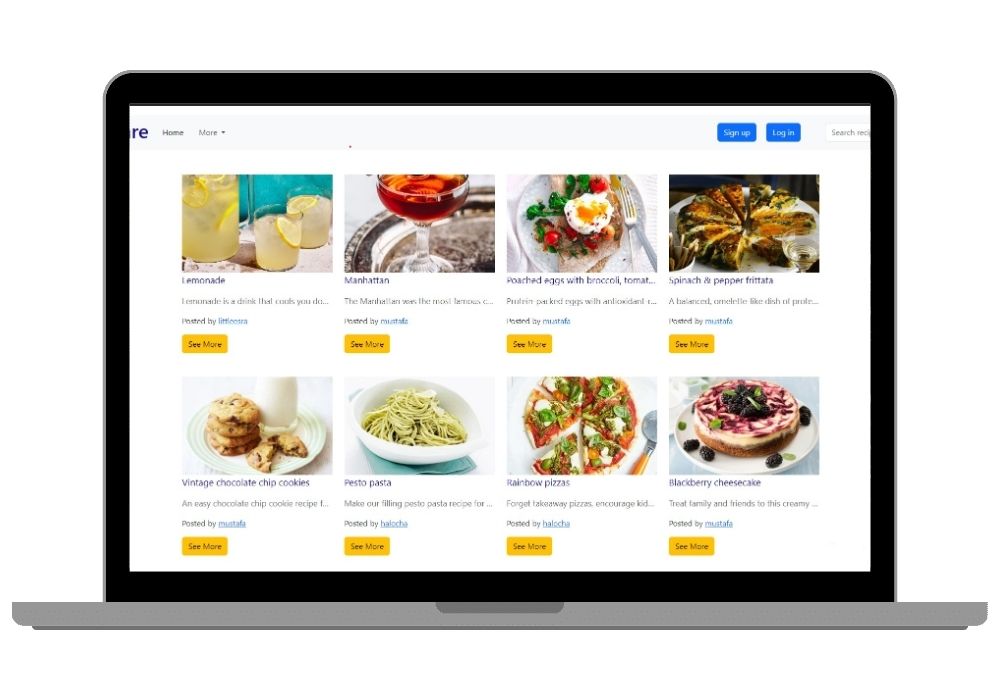
Django web app where registered users publish their own recipes and search everyone else's by cuisine, preparation time, main ingredient or dish type. Filters combine, so you can narrow down to Italian dishes under 30 minutes that use paneer.
Technology Used
Frontend: HTML/CSS/JS | Backend: Python (Django) | Database: PostgreSQL/MySQL /SQLLite | Authentication: Django Authentication / Firebase Authentication


Project Files
Recipe Finder is a Django web app where people sign up, post their own recipes, and search through what everyone else has posted. That is the whole idea. No AI, no external API calls, no image recognition — every recipe in the database was typed in by a user.
Read This First If You Are Comparing Recipe Projects
CodeAj has three recipe projects and they are not variations of each other. This one is a database and forms project. It does not generate recipes, and it cannot tell you what food is in a photo.
If you need a language model writing recipes for you, that is the Personalized Recipe Generator. If you need deep learning on food images, that is the AI Recipe Generator with food image recognition. Pick this one when your syllabus asks for Django models, forms, querysets and authentication rather than machine learning.
The Search Is the Interesting Part
There are two search modes and they work quite differently.
Basic search is the bar on the homepage. Type a recipe name, hit enter, get matches. Nothing clever.
Advanced search lives under the More dropdown and is where the actual query logic sits. You can filter on four fields at once — cuisine, preparation time, main ingredient, and dish type. The filters stack, so a search for Italian dishes under 30 minutes using paneer is one query, not three. If you are going to study one file in this codebase before your viva, make it the view that builds this queryset.
What a Recipe Record Holds
Nine fields per recipe:
- Recipe name
- Ingredients list
- Cooking method or steps
- Dish type
- Preparation time
- Cuisine
- Main ingredient
- Photo upload
- Short description
Four of those nine also work as filter dimensions in advanced search, which is why the model was structured this way rather than dumping everything into one text blob.
What Logged-In Users Can Do
- Register, log in, log out — standard Django session auth
- Create a recipe through a form, with photo upload
- Edit or delete their own recipes, and only their own
- Click any username on the site to open that person's profile and see everything they have published
That last one is small but it turns a recipe list into something closer to a community site. It also means you have a working example of filtering a queryset by a foreign key, which examiners tend to ask about.
Technology
- Backend: Python with Django
- Frontend: HTML, CSS and JavaScript — no React, no build step
- Database: Runs on SQLite out of the box. Switch to PostgreSQL or MySQL by editing the DATABASES block in settings.py
- Authentication: Django's built-in auth by default. Firebase Authentication is also wired up if you want to demo an external identity provider
The no-build-step part matters more than it sounds. You clone it, install requirements, run migrations, and it works. No npm, no bundler, no version conflicts the night before submission.
Who This Suits
Students in a web development or DBMS course where the requirement is a working full-stack app with user accounts and non-trivial queries. Also anyone learning Django who wants a real project to read rather than another tutorial to-do list.
Skip it if your project must include machine learning. It will not pass that requirement, and the two AI recipe projects linked above exist for exactly that reason.
Where People Take It Next
Common additions students build on top: a ratings or comments system, saving other users' recipes to a favourites list, tags with a many-to-many relationship, pagination once the recipe count grows, and a Django REST Framework layer so a mobile app can hit the same data.
Frequently Asked Questions
Extra Add-Ons Available – Elevate Your Project
Add any of these professional upgrades to save time and impress your evaluators.
Project Setup
We'll install and configure the project on your PC via remote session (Google Meet, Zoom, or AnyDesk).
Source Code Explanation
1-hour live session to explain logic, flow, database design, and key features.
Want to know exactly how the setup works? Review our detailed step-by-step process before scheduling your session.
₹999
Custom Documents (College-Tailored)
- Custom Project Report: ₹1,500
- Custom Research Paper: ₹1,000
- Custom PPT: ₹800
Fully customized to match your college format, guidelines, and submission standards.
Project Modification
Need feature changes, UI updates, or new features added?
Charges vary based on complexity.
We'll review your request and provide a clear quote before starting work.