BreastGuard AI Breast Ultrasound Image Classification with OpenCV & SVM (Benign / Malignant / Normal)
Computer vision project that classifies breast ultrasound images into three categories including Normal. OpenCV converts each scan to a 16,384-feature vector, and a GridSearchCV-tuned SVM predicts the class at 97% accuracy.
Technology Used
Python 3.10.11 | Flask | Scikit-learn | OpenCV | NumPy | Matplotlib | Seaborn | HTML5 | CSS3 | JavaScript


Project Files
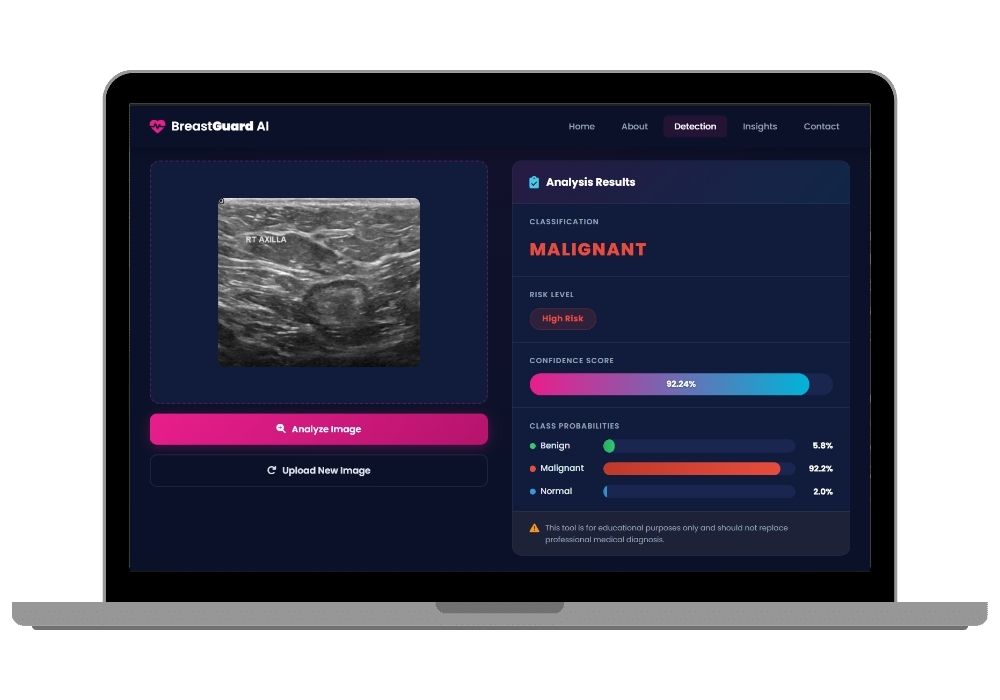
BreastGuard AI is a computer vision project that classifies breast ultrasound scan images into three categories — Benign, Malignant, or Normal. You upload an ultrasound image, OpenCV preprocesses it, and a tuned Support Vector Machine returns the class with a confidence score.
Why the Third Class Matters
Most breast cancer academic projects are binary — tumour present or absent. BreastGuard AI adds a Normal class, meaning the model must also recognise healthy tissue with no lesion at all. This three-way separation is significantly harder to train and is a strong talking point during viva, because it mirrors how a real screening workflow actually operates.
If your project requirement is classical ML on numeric lab values rather than image processing, MediPredict AI is the tabular alternative — it takes 30 cell-nucleus measurements as form input instead of a scan.
The Image Processing Pipeline
- Grayscale conversion — ultrasound scans carry no useful colour information, so channels are collapsed to one
- Resize to 128 × 128 — every input is normalised to a fixed dimension regardless of source resolution
- Flattening — the 2D pixel matrix becomes a single vector of 16,384 features
- StandardScaler normalisation — pixel intensities are centred and scaled before training
- SVM classification — the tuned classifier predicts the class and outputs probability scores
Model Selection and Tuning
Three algorithms were trained and benchmarked on the same preprocessed data — Logistic Regression, K-Nearest Neighbors, and Support Vector Machine. SVM outperformed the others, and its kernel and regularisation parameters were then optimised using GridSearchCV, reaching 97% accuracy on the test split. The comparison results are included so you can present the full model-selection reasoning, not just the final number.
Key Features
- Three-class output — Benign, Malignant, and Normal, with per-class probability
- Direct image upload — drop in any ultrasound scan through the Flask interface
- Documented OpenCV pipeline — every preprocessing step is separable and inspectable
- Model comparison included — LR vs KNN vs SVM benchmark results ready to present
- Visual analysis — Matplotlib and Seaborn plots for confusion matrix and accuracy comparison
- Trained
.pklmodels included — run predictions immediately without retraining
Technology Stack
- Language: Python 3.10.11
- Backend: Flask
- Computer Vision: OpenCV
- Machine Learning: Scikit-learn (SVM, GridSearchCV, StandardScaler)
- Analysis & Plots: NumPy, Matplotlib, Seaborn
- Frontend: HTML5, CSS3, JavaScript
Complete Submission Package
- Full source code with the training notebook
- Trained model files (
.pkl) - Dataset structure and folder organisation guide
- Detailed project report in Word format
- Research paper draft, formatted for submission
- PowerPoint presentation
- Installation and setup support
Best Suited For
- Computer Vision and Medical Imaging final year projects
- Biomedical Engineering students working on diagnostic support systems
- Anyone who needs to demonstrate an end-to-end image classification pipeline — preprocessing through web deployment
- Students whose department expects a full documentation set alongside working code
Frequently Asked Questions
Extra Add-Ons Available – Elevate Your Project
Add any of these professional upgrades to save time and impress your evaluators.
Project Setup
We'll install and configure the project on your PC via remote session (Google Meet, Zoom, or AnyDesk).
Source Code Explanation
1-hour live session to explain logic, flow, database design, and key features.
Want to know exactly how the setup works? Review our detailed step-by-step process before scheduling your session.
₹999
Custom Documents (College-Tailored)
- Custom Project Report: ₹1,500
- Custom Research Paper: ₹1,000
- Custom PPT: ₹800
Fully customized to match your college format, guidelines, and submission standards.
Project Modification
Need feature changes, UI updates, or new features added?
Charges vary based on complexity.
We'll review your request and provide a clear quote before starting work.